How to Build an AI Agent: A 3-Level Roadmap From Beginner to Production
Most AI agent tutorials stop at the demo. This roadmap takes you all the way to production.

Most AI agent tutorials stop at the demo. This roadmap takes you all the way to production.

Building an AI agent that works in a demo takes an afternoon. Building one that still works on a busy Tuesday, with real users, messy data, and an API that times out, takes a different set of skills.
At Turing Technologies, we build AI and SaaS products for clients, and that gap is where much of our engineering effort goes. Most tutorials teach the first part. You see a prompt, a tool call, a clean answer, and the video ends. That is why so many people learning agents end up with a folder of demos and nothing in production. Companies hit the same wall. In June 2025, Gartner predicted that more than 40% of agentic AI projects will be canceled by the end of 2027, citing rising costs, unclear business value, and weak risk controls.
A better prompt fixes none of those. Retrieval, tool design, memory, testing, and guardrails do. That is the less exciting part of the work, and it is where our team spends most of its time. This guide walks through it the way we would explain it to an engineer joining our team.
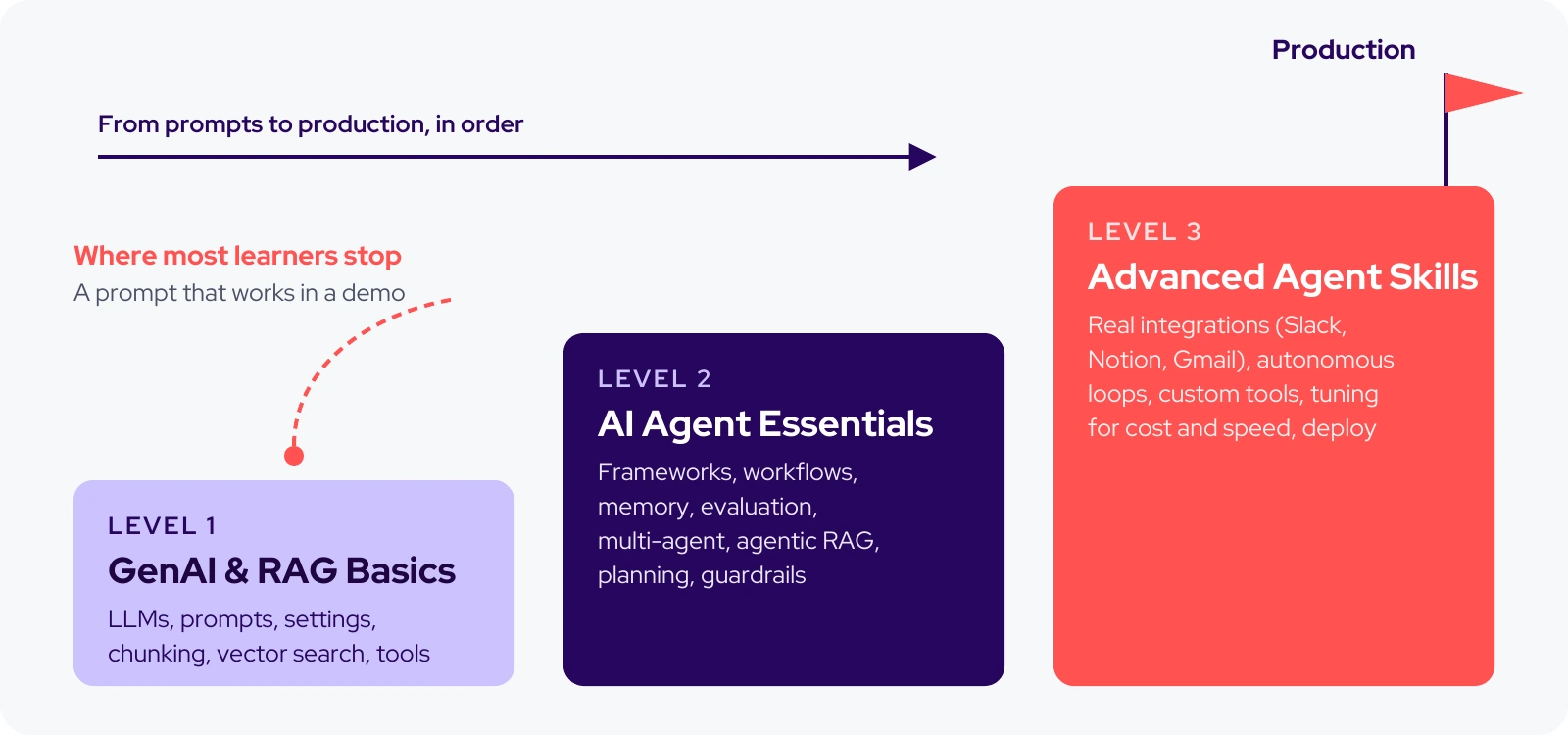
Figure 1. The AI agent roadmap. Each level builds on the skills below it.
This AI agent roadmap has three levels, and the path is the same whether you want to create an AI agent for your own team or build agents for clients. Each level ends with a project and a simple check for whether you are ready to move on. To keep things concrete, we will follow one typical project the whole way through.
An AI agent is software that uses a large language model to decide on and carry out the steps toward a goal. It uses tools such as search, databases, and APIs, and it keeps going until the goal is met or it reaches a limit you set.
A chatbot answers questions. An agent works toward a goal. It decides what to do next, uses a tool to do it, looks at the result, and repeats.
Three parts make this work. The model decides. Tools are how it touches the outside world: a search, a database, an email API. Memory is its record of what it has already tried. Every skill in this roadmap improves one piece of the loop below.
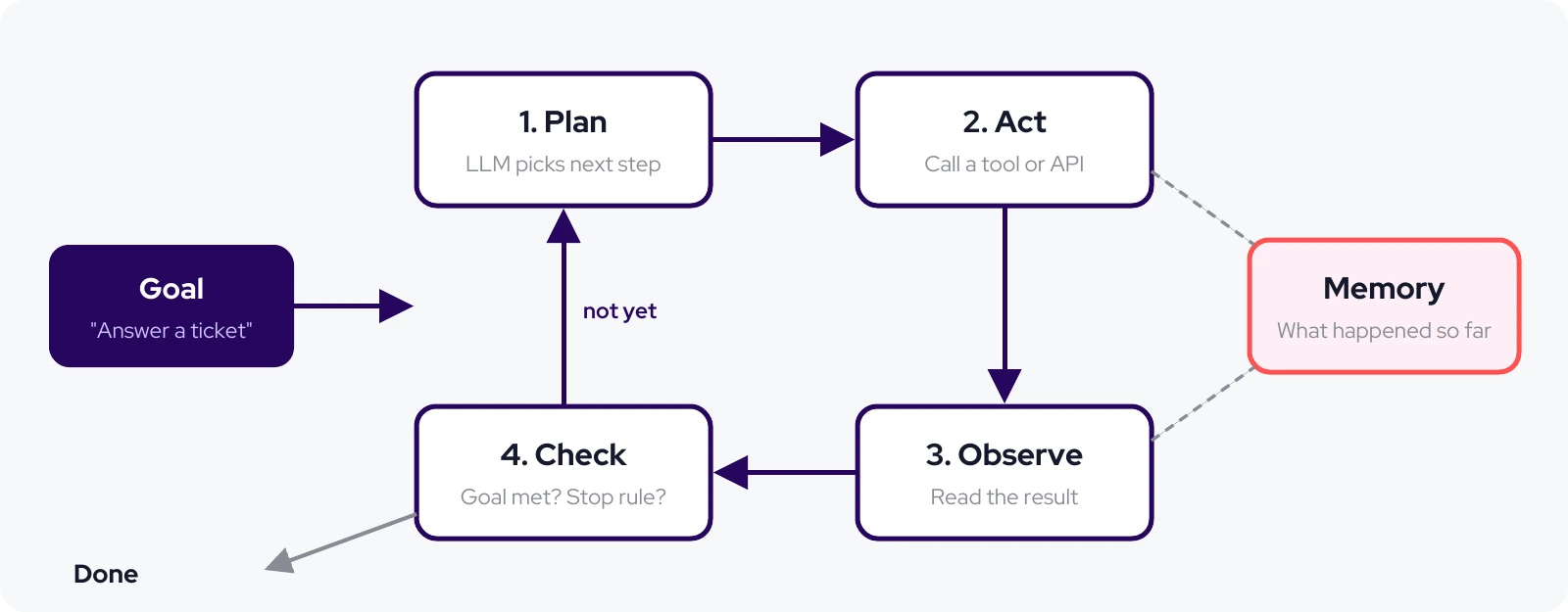
Figure 2. The agent loop: plan, act, observe, check, repeat. Memory feeds every step.
Goal: understand what language models can and cannot do, and learn to give them the right information at the right time.
Generative AI produces text by predicting what should come next, based on patterns it learned in training. That makes it strong at drafting, summarizing, sorting, and pulling details out of messy text. It is weak at exact arithmetic, at facts it never saw, and at anything that must be right every time with no check. Knowing this early saves you from building an agent for a job a spreadsheet formula would do better.
You do not need the math. You need two facts. First, a large language model (LLM) is trained on a huge snapshot of text, then tuned to follow instructions. Second, it does not look anything up while it answers. It knows its training data and whatever you put in the prompt.
So if the store changed its return policy last month, the model has no idea. Retrieval, covered below, exists to close exactly that gap.
Think of a prompt as instructions for a smart new hire who knows nothing about your business. Compare these two:
The second version says who the model is, what it may rely on, what to do when it is stuck, and what a good answer looks like. When we review an AI feature that gives bad answers, a prompt that leaves one of those out is one of the first things we look for.
Some newer reasoning models fix or ignore some of these settings, so check your provider's documentation before tuning them.
Retrieval is only as good as the text you feed it. Strip out menus, footers, and repeated disclaimers. Split long pages into chunks of a few hundred words, with a small overlap so a rule is not cut in half. Attach useful labels to each chunk, such as the page title and the date it was last updated, so you can filter and cite later.
A quick test: read five random chunks. If you cannot tell what a chunk is about on its own, the model will not be able to either.
Retrieval-Augmented Generation (RAG) is a method that retrieves relevant passages from your own documents and adds them to the prompt before the model answers. The model then answers from your facts instead of its memory, and it can point to the page it used.
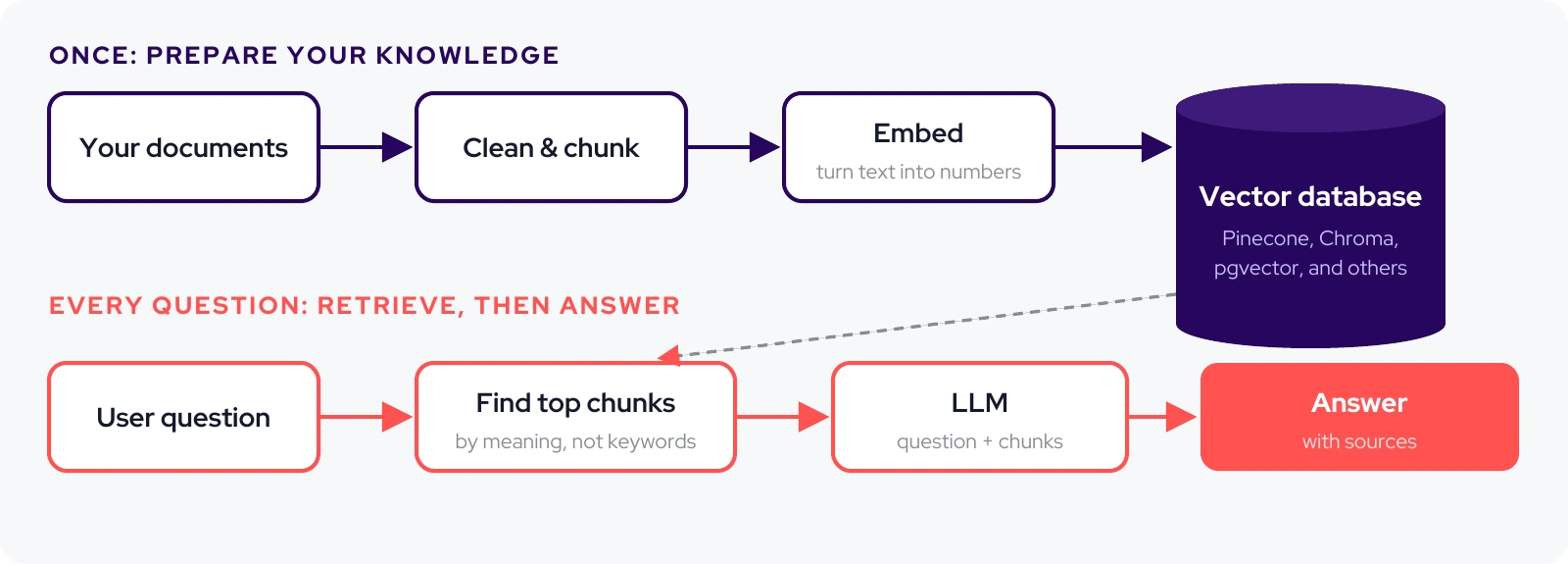
Figure 3. How RAG works. Prepare your knowledge once, then retrieve the best pieces for every question.
A vector database stores each chunk as an embedding, a list of numbers that captures its meaning. That lets a search for "can I send back boots I wore once" find the chunk titled "Returns on used items" even though the words differ. Chroma runs on your laptop and is ideal for learning. Pinecone is a popular managed service. If your app already uses Postgres, the pgvector extension keeps everything in one place. For a first project the choice matters far less than how well you chunked the data.
Loading files, chunking, connecting to a vector database, and switching between model providers is repetitive code. These libraries handle it. LlamaIndex is especially strong at retrieval. LangChain covers more ground and leads directly into the agent tools in Level 2. Pick one; you can learn the other later in a weekend.
Tool calling is the bridge to agents. You describe a function to the model, it decides when to call it and with what inputs, your code runs it, and the result goes back to the model. The model chooses tools almost entirely from their names and descriptions, so write those carefully:
The better version tells the model what the tool does, what the input looks like, what comes back, and when to use it. When an agent calls the wrong tool, the tool description is the first thing we check.
You are ready for Level 2 when you can look at a wrong answer and say whether the retrieval, the data, or the prompt caused it.
Goal: build agents that plan and act reliably. This is where most learners stall, because the work changes from getting one good answer to getting good behavior every time.
In Level 1, your code decided the order of steps. Now the model decides which tool to use, in what order, and when it is finished (go back to Figure 2). That freedom is what makes agents useful for messy tasks, and it is also where nearly every new failure comes from.
There are many agent frameworks, and they change quickly. Learn one well, then pick up the others by comparison. These are the main options as of late 2026:
LangChain vs. LangGraph: use LangChain to get a standard agent running quickly. Move to LangGraph, which LangChain agents already run on, when you need explicit control over each step, branching, retries, or state that lasts across long tasks. When engineers on our team are new to agents, we usually point them to LangChain first. Here is the support assistant's first agent, using the tool from Level 1:
The model reads the question, decides to call get_order_status, reads what comes back, and writes the reply. That is the whole loop from Figure 2 in about 20 lines. The model name is only an example; any provider LangChain supports will work.
The fastest way to learn how to create an AI agent is to give it one real job. Real means it touches something outside the chat: an API, a database, a file. Keep the scope narrow. "Answer where-is-my-order questions from start to finish" is a good first agent. "Handle customer support" is not, because you will never know when it is done or whether it is working.
One of the first questions we ask on any agent project is whether it needs to be an agent at all. Many tasks that get called "agentic" do not. If you already know the steps, write them as a fixed workflow and use the model inside each step. Save agent freedom for the parts that truly change from case to case.
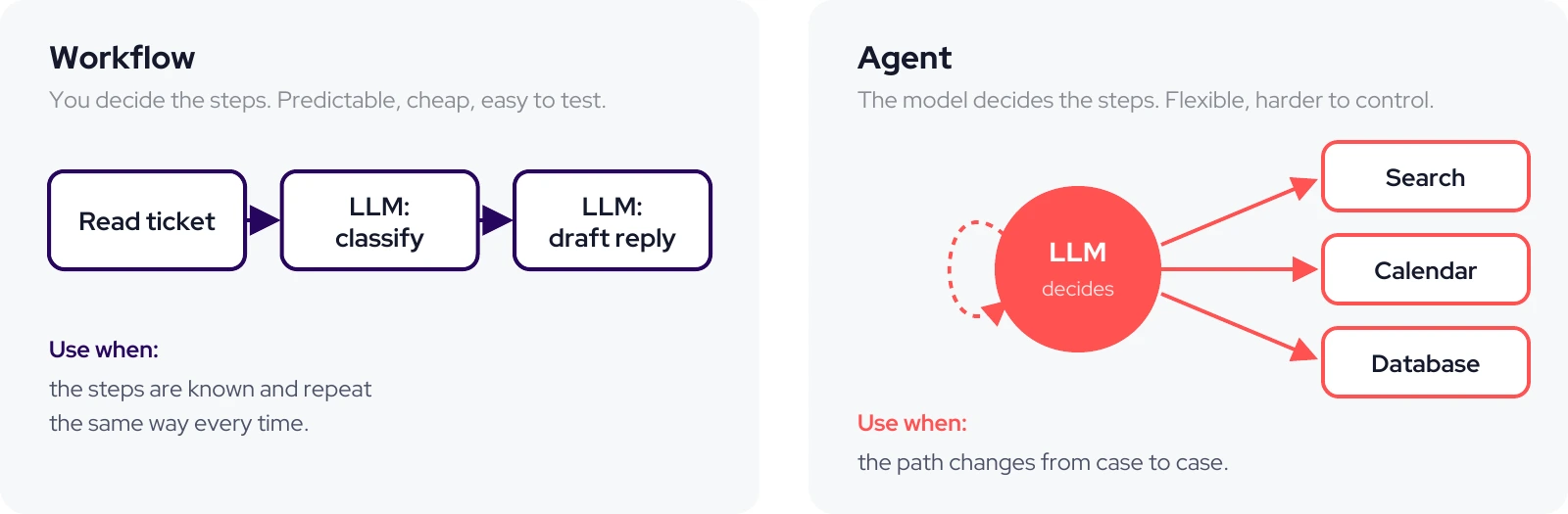
Figure 4. Workflow or agent? Start with a workflow. Add agent freedom only where you need it.
In the support example, "sort the ticket, find the relevant policy, draft a reply" is a workflow. Only the messy tickets, such as a customer with three orders, one damaged item, and a coupon that did not apply, need an agent that decides its own next step.
Short-term memory is the record of the current task: the conversation so far and the tool results. It stops the agent from checking the same order twice. Long-term memory carries across sessions, such as a customer's past tickets or a stated preference, and usually lives in a database.
Save facts and decisions, not whole transcripts. Everything you put back into the prompt costs money and competes for the model's attention.
An evaluation set, or "eval set," is a list of realistic tasks with a clear definition of a correct result. It turns "the agent seems better" into a number. A few rows from the support assistant's eval set:
We treat the eval set as part of the product, not a side task. Start with 20 to 50 tasks. Run them after every change and track four numbers: success rate, steps per task, time, and cost. When a task fails, read the full record of what the agent did step by step. The cause is usually obvious once you see it.
For harder tasks, ask the agent to write a short plan before it acts and to check its work against the goal at the end. Spell out what "done" means in the prompt, such as "Done means the customer has a delivery date or a refund draft is waiting for approval." Agents without a clear finish line tend to keep going.
When a single agent has too many tools and too many jobs, its choices get worse. Splitting the work helps: one agent handles orders, one handles returns, and a supervisor agent routes each ticket. Each agent gets a smaller job and fewer tools. The trade-off is cost and complexity, since every extra agent adds model calls and new ways to fail. Get one agent solid before you add a second.
Agentic RAG is retrieval where the agent decides how, where, and how many times to search before it answers. Standard RAG searches once and answers. Agentic RAG lets the agent decide how to search: rewrite a vague question, search more than one source, notice when results look weak, and search again before answering. It is slower and costs more, so use it for questions where a single search often misses.
Tools fail. Orders are not found, APIs time out, and customers mistype numbers. Decide in advance what the agent does next: retry once, try another route, or ask the customer. Write error messages for the model, not for a developer:
Before an agent touches a real system, we write down what it may never do on its own, and we enforce that in code rather than in the prompt alone. For the support assistant that means: only the tools it needs, a cap on steps and spend per ticket, a check that replies never include payment details, and a person's approval before any refund, cancellation, or email to a customer.
You are ready for Level 3 when you can show numbers proving a change made the agent better, and it never takes a risky action without approval.
Goal: agents that run in production and solve real problems for real users.
An agent is far more useful inside the tools a team already works in than in a separate chat window. The standard way to connect agents to those tools today is the Model Context Protocol (MCP), an open standard Anthropic created and, in December 2025, donated to the new Agentic AI Foundation under the Linux Foundation. Many apps now offer ready-made MCP servers, so you can connect a tool instead of writing every integration by hand.
Some agents should not wait for someone to type. The support assistant can start on its own whenever a new ticket arrives. Agents that run unattended need firm limits: a maximum number of steps, a spending cap, a time limit, and a log of every action so a person can review what happened.
Your internal APIs, databases, and business rules are what make your agent different from a demo. Wrap each one as a tool with a clear name, strict input rules, and helpful error messages, as in Level 1. The same rules that make an API pleasant for developers apply here; we covered them in Lessons from building enterprise-facing APIs. One focused tool, like check_return_eligibility, is easier for the model to use correctly than one general tool that does five things.
Going live means more than putting the agent on a server. You need sign-in and permissions, tracing so you can replay every step the agent took (often called AI agent observability), alerts when errors or costs jump, a simple way for users to flag a bad reply, and a way to roll back a change that made things worse. Figure 5 shows how these pieces fit together in a production AI agent architecture. We do not consider an agent shipped until someone on the team can replay any run and undo a bad change.
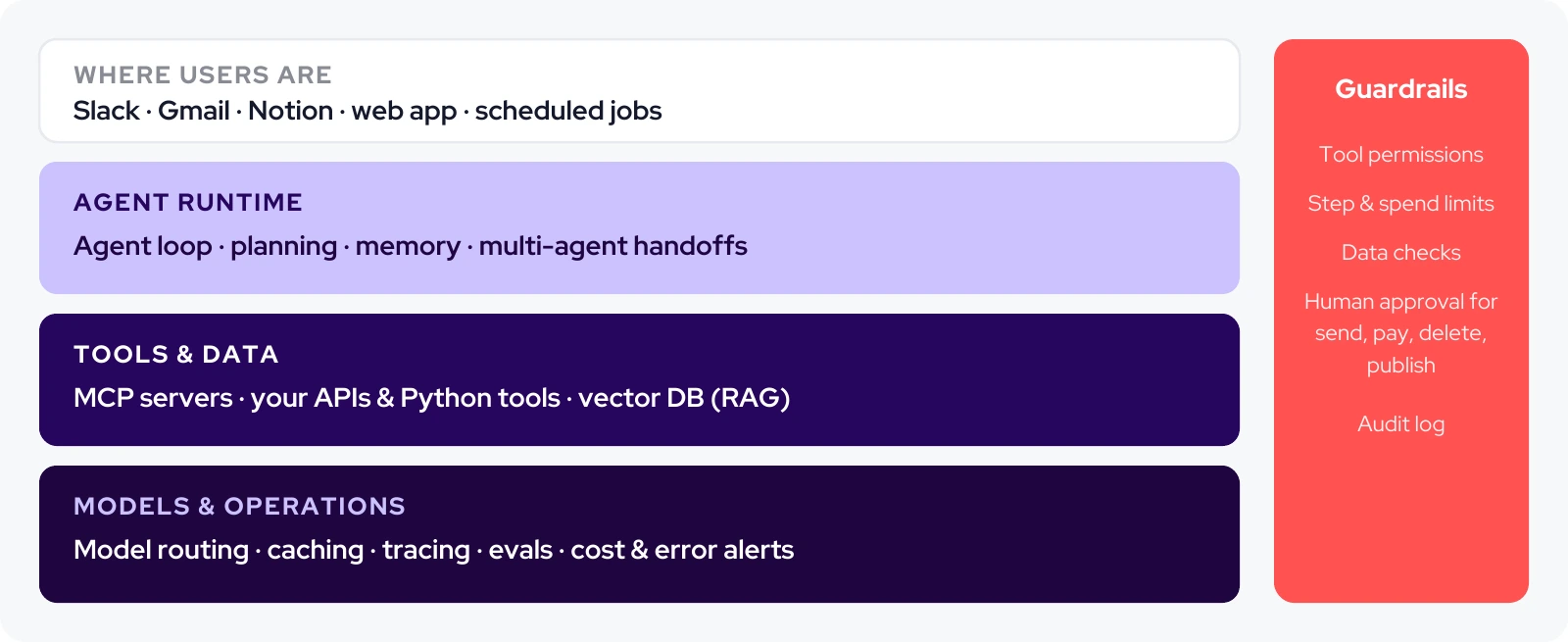
Figure 5. A production AI agent architecture. The prompt is one small part of a much bigger system.
In our experience, agents fail in the same handful of ways. When something goes wrong, this is where we start:
With 5 to 8 hours a week, this pace is realistic. Stretch it if you need to; the order matters more than the speed.
Frameworks will keep changing. The agent loop, retrieval, evals, and guardrails will not, and those are the skills this roadmap is really teaching. Learn them in order, build at every level, and you will end up with more than a demo.
If you are planning an AI agent for your business and want a team that works this way, talk to us at Turing Technologies.
With 5 to 8 hours a week, most people can build and deploy a working agent in about 12 weeks by following the three levels in order. If you already write Python and have built a RAG app, you can move through Level 1 in a week or two.
No-code builders can handle simple agents. To build agents that connect to your own systems and run in production, basic Python is enough to start, and you will pick up the rest through the projects in this roadmap.
An AI agent is one system that pursues a goal using tools. Agentic AI is the broader term for AI that acts with some independence, which includes single agents, teams of agents, and agentic workflows. In everyday use, people often treat the two terms as the same thing.
Generative AI creates content, such as text or images, in response to a prompt. Agentic AI uses generative models to decide on and take actions toward a goal, such as looking up an order and drafting a refund.
RAG searches your documents once and passes the results to the model. Agentic RAG lets the agent rewrite the question, search several sources, and search again when results are weak. It gives better answers to hard questions, at a higher cost per answer.
There is no single best framework. LangChain is the fastest way to start, LangGraph gives the most control, CrewAI suits role-based teams of agents, Microsoft Agent Framework fits Python and .NET teams on Microsoft stacks, and Agno is a lightweight Python option. Pick one and learn it well before comparing.
Common examples include a customer support AI agent that checks orders and drafts replies, a research agent that gathers sources and writes a brief, and an inbox agent that sorts email and drafts responses for approval. All three are built from the same loop: plan, act, observe, check.


